- Published on
- • 2 min read
GraphQL Ruby Mutation with input object type
- Authors

- Name
- Shaiju Edakulangara
- @eshaiju
In my previous post on GraphQL mutations, I used individual input_field declarations. While this works, it can become unmanageable for objects with many fields.
The Problem
Individually assigning fields in the resolver is tedious:
resolve lambda { |object, inputs, ctx|
  article = Article.new(title: inputs[:title], body: inputs[:body])
  # ...
}
The Solution: InputObjectType
By grouping fields, we can use mass assignment (with .to_h):
article = Article.new(inputs[:article].to_h)
1. Define the Input Object
Create a new folder app/graphql/input_objects/:
# app/graphql/input_objects/article_input_object_type.rb
ArticleInputObjectType = GraphQL::InputObjectType.define do
  name 'ArticleInput'
  input_field :title, !types.String
  input_field :body, !types.String
end
2. Autoload the New Path
In config/application.rb:
config.autoload_paths << Rails.root.join('app/graphql/input_objects')
3. Update the Mutation
Use !ArticleInputObjectType as an input field:
# app/graphql/mutations/article_mutations.rb
module ArticleMutations
  Create = GraphQL::Relay::Mutation.define do
    name 'AddArticle'
    input_field :article, !ArticleInputObjectType

    # ...
    resolve lambda { |object, inputs, ctx|
      article = Article.new(inputs[:article].to_h)
      if article.save
        { article: article }
      else
        { errors: article.errors.to_a }
      end
    }
  end
end
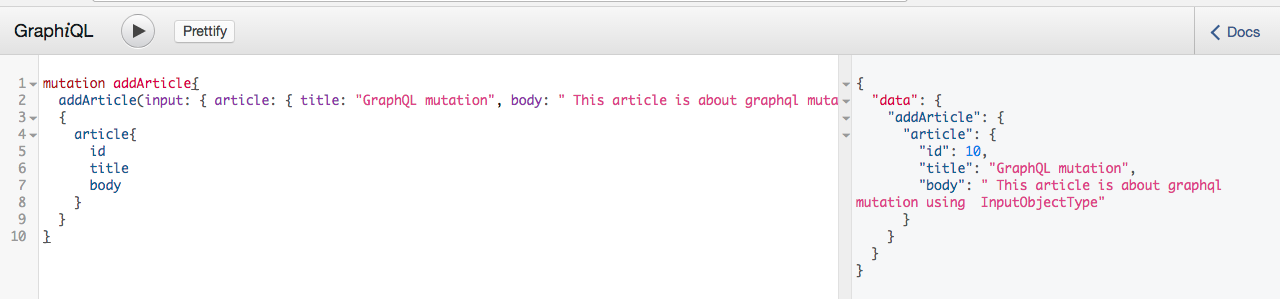
4. Running the Mutation
mutation addArticle {
  addArticle(input: { article: { title: "New Article", body: "Content here" } }) {
    article {
      id
      title
    }
  }
}
Mapping CamelCase to SnakeCase
Use the as keyword to map frontend camelCase to backend snake_case:
input_field :articleId, !types.ID, as: :article_id
Sample code is available here.