- Published on
- • 6 min read
Beyond the Big Three: Building Custom NodeLLM Providers for Enterprise Cloud Gateways
- Authors

- Name
- Shaiju Edakulangara
- @eshaiju
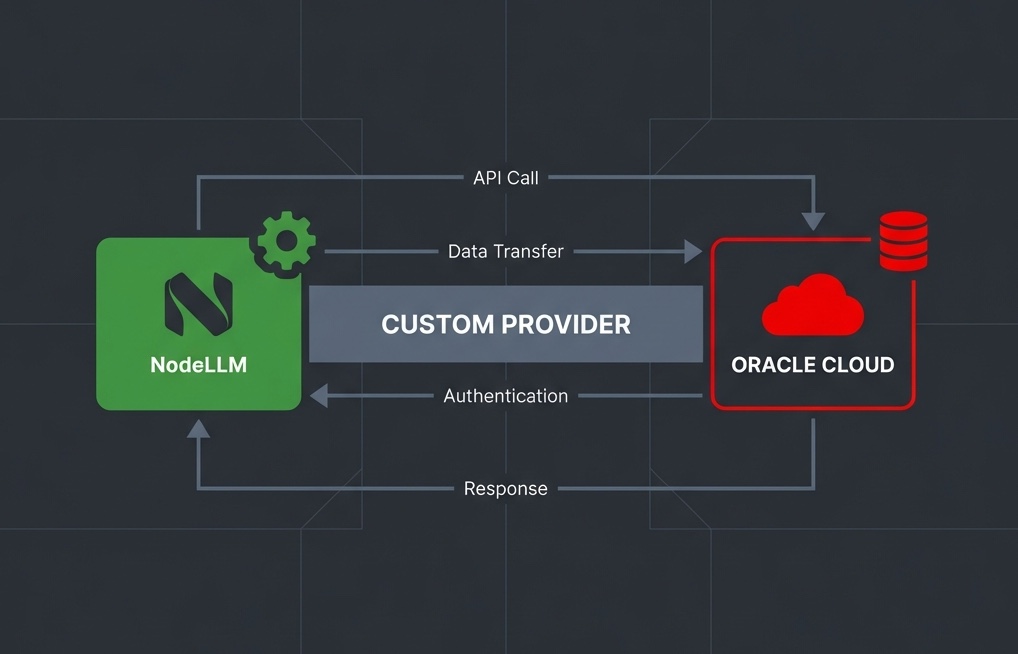
This is the architectural bridge I use to keep my systems provider-agnostic—even when using proprietary cloud gateways.
In a mature software ecosystem, Large Language Models (LLMs) should be treated as interchangeable infrastructure. If your application code is littered with new OpenAI() or @google/generative-ai constructors, you aren't building a system; you're building a dependency.
NodeLLM was designed to solve this via Provider Isolation. But what happens when you need to use a model that isn't supported out of the box? Or what if your organisation requires you to route all traffic through a proprietary cloud gateway like Oracle Cloud (OCI) to access models like Cohere Command R?
You build a Custom Provider.
The Contract: BaseProvider
NodeLLM uses an interface-driven approach. To add a new provider, you don't need to hack the core library. You simply extend the BaseProvider class.
This class acts as a safety net. It provides default implementations for advanced features, so your custom provider only needs to implement what your specific service supports.
The Compliance Driver: Data Residency and Protection
Beyond pure technical modularity, custom providers are often a legal necessity.
For enterprises operating in highly regulated sectors (finance, healthcare, government), where and how data is handled is just as important as the model's performance. Using a custom provider via a regional cloud gateway like OCI (Oracle Cloud Infrastructure) allows you to solve for:
- Data Residency (Sovereignty): Many jurisdictions require that data never leaves a specific geographic border. By building a custom provider for a local cloud instance, you ensure your LLM traffic stays within the required region.
- Data Protection: Enterprise-grade gateways (like OCI's Generative AI service) provide private connectivity and "zero-data-retention" guarantees that are non-negotiable for large-scale systems.
- Regional Availability: A custom provider allows you to tap into local infrastructure providers that are authorised to operate in specific regions without changing your application code.
Implementation: Cohere via Oracle Cloud
Oracle's Generative AI service requires RSA-SHA256 Request Signing. While you could use the OCI SDK, we'll implement it manually using Node.js's native crypto module. This keeps your custom provider zero-dependency and avoids the overhead of a massive cloud SDK.
1. Define the Provider and Signer
import crypto from "crypto";
import { BaseProvider, ChatRequest, ChatResponse, fetchWithTimeout } from "@node-llm/core";

export class OracleCohereProvider extends BaseProvider {
  private tenancyId: string;
  private userId: string;
  private fingerprint: string;
  private privateKey: string;
  private compartmentId: string;
  private region: string;
  private apiBase: string;

  constructor(config: any = {}) {
    super();
    this.tenancyId = config.tenancyId || process.env.OCI_TENANCY;
    this.userId = config.userId || process.env.OCI_USER_ID;
    this.fingerprint = config.fingerprint || process.env.OCI_FINGERPRINT;
    this.privateKey = config.privateKey || process.env.OCI_PRIVATE_KEY;
    this.compartmentId = config.compartmentId || process.env.OCI_COMPARTMENT_ID;
    this.region = config.region || "us-ashburn-1";
    this.apiBase = `https://inference.generativeai.${this.region}.oci.oraclecloud.com`;
  }

  protected providerName() { return "oracle-cohere"; }

  /**
   * Generates the OCI Authorization header
   */
  private sign(method: string, url: string, body: any) {
    const parsedUrl = new URL(url);
    const date = new Date().toUTCString();
    const bodyString = JSON.stringify(body);
    const hash = crypto.createHash("sha256").update(bodyString).digest("base64");

    const signingHeaders = ["date", "(request-target)", "host", "content-type", "content-length", "x-content-sha256"];
    const headers: any = {
      date: date,
      host: parsedUrl.host,
      "content-type": "application/json",
      "content-length": Buffer.byteLength(bodyString).toString(),
      "x-content-sha256": hash
    };

    const signingString = signingHeaders.map(h => {
      if (h === "(request-target)") return `(request-target): ${method.toLowerCase()} ${parsedUrl.pathname}`;
      return `${h}: ${headers[h]}`;
    }).join("\n");

    const signature = crypto.createSign("RSA-SHA256").update(signingString).sign(this.privateKey, "base64");
    const keyId = `${this.tenancyId}/${this.userId}/${this.fingerprint}`;

    headers["Authorization"] = `Signature version="1",keyId="${keyId}",algorithm="rsa-sha256",headers="${signingHeaders.join(" ")}",signature="${signature}"`;
    return headers;
  }
}
2. Map the Request and Response
We map NodeLLM’s ChatRequest to the specific OCI Chat structure. Notice that for Oracle Cloud, we must specify the servingType as ON_DEMAND.
export class OracleCohereProvider extends BaseProvider {
  // ... (previous methods)

  async chat(request: ChatRequest): Promise<ChatResponse> {
    const { model, messages, requestTimeout } = request;
    const url = `${this.apiBase}/20231130/actions/chat`;

    const body = {
      compartmentId: this.compartmentId,
      servingMode: { servingType: "ON_DEMAND", modelId: model },
      chatRequest: {
        apiFormat: "COHERE",
        message: messages[messages.length - 1].content,
        chatHistory: messages.slice(0, -1).map(m => ({
          role: m.role === "user" ? "USER" : "CHATBOT",
          message: m.content
        }))
      }
    };

    const response = await fetchWithTimeout(url, {
      method: "POST",
      headers: this.sign("POST", url, body),
      body: JSON.stringify(body)
    }, requestTimeout);

    const data = await response.json();
    const usage = data.chatResponse.usage || {};

    return {
      content: data.chatResponse.text,
      usage: {
        input_tokens: usage.promptTokens || 0,
        output_tokens: usage.completionTokens || 0,
        total_tokens: usage.totalTokens || 0
      }
    };
  }

  public defaultModel() {
    return process.env.OCI_COHERE_MODEL_ID;
  }
}
Registering and Using the Provider
We register the provider with NodeLLM during initialisation. Because we've adhered to the BaseProvider contract, our custom provider becomes a "first-class citizen."
import { NodeLLM, createLLM } from "@node-llm/core";

NodeLLM.registerProvider("oracle", () => {
  return new OracleCohereProvider({
    tenancyId: process.env.OCI_TENANCY!,
    userId: process.env.OCI_USER_ID!,
    fingerprint: process.env.OCI_FINGERPRINT!,
    privateKey: process.env.OCI_PRIVATE_KEY!,
    compartmentId: process.env.OCI_COMPARTMENT_ID!,
    region: process.env.OCI_REGION || "us-ashburn-1"
  });
});

// The application code stays identical to OpenAI/Gemini
const llm = createLLM({ provider: "oracle" });
const response = await llm.chat().ask("Explain the benefits of provider agnosticism.");
Works out of the box with the ORM Layer
One of the biggest advantages of this pattern is that it automatically works with the NodeLLM ORM layer (@node-llm/orm).
Because the ORM speaks the NodeLLM interface, it doesn't care that oracle is a custom provider you just wrote. It will handle session persistence, message history, and metadata saving to your database (Postgres, SQLite, etc.) without any extra configuration.
import { createChat } from "@node-llm/orm/prisma";
import { prisma } from "./lib/db";
import { NodeLLM } from "@node-llm/core";

// Create a persistent chat session using your custom provider
const chat = await createChat(prisma, NodeLLM, {
  provider: "oracle",
  model: "ocid1.generativeaimodel.oc1.us-ashburn-1...",
  instructions: "You are a regional compliance auditor."
});

// The ORM persists this turn automatically to your database
await chat.ask("What is the status of the regional compliance audit?");
The Architecture Advantage
While it’s tempting to just write a quick helper function for a specific API, building a Custom Provider offers significant long-term benefits:
- Zero-Dependency Portability: By using manual signing, you avoid dragging several megabytes of vendor SDKs into your project.
- Unified Observability: All your
onNewMessageorbeforeRequesthooks work automatically with the new provider. - ORM Ready: Your custom provider instantly gains persistence capabilities through
@node-llm/orm. - Simplified Testing: You can swap "Oracle" for a "Mock" provider in your integration tests without touching business logic.
Building custom providers is about adhering to a contract that keeps your system flexible, compliant, and ready for whatever model comes next.
Ready to extend your stack? Explore the Custom Provider Example in the official repository.